API Endpoints
There are five GET and two POST API endpoints
- All request parameters will be validated. If a different field is passed in the payload other than the expected, API will respond with error for that field.
- Every API will have a uniqueId in the response payload. This can be helpful in tracking/debugging that specific request.

Flow Diagram
Section titled “Flow Diagram”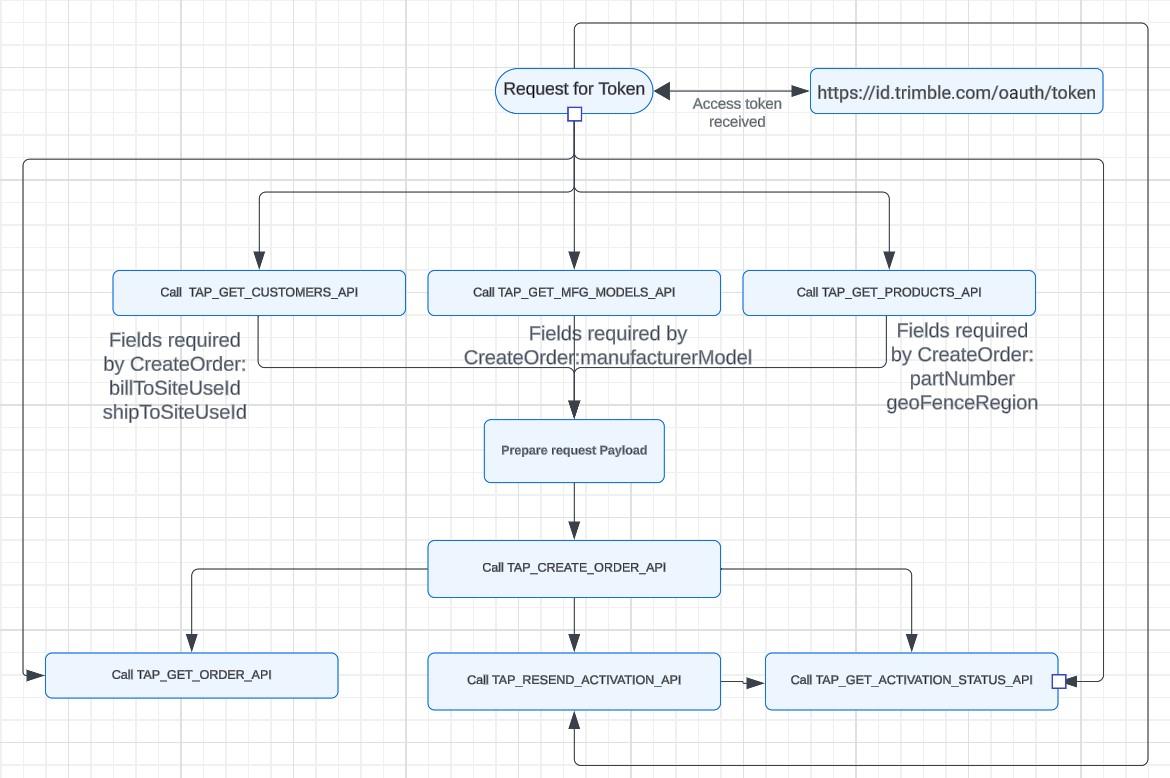
Endpoints
Section titled “Endpoints”TAP_GET_CUSTOMERS_API
Section titled “TAP_GET_CUSTOMERS_API”Returns a list of reseller and end customer associated to Consumer’s identifier(clientId)
Base URI
https://cloud.stage.api.trimblecloud.com/cloud/TAPStoreAPIs/v1?request={"ProcName": "TAP_GET_CUSTOMERS_API","ProcRequester": "TAP"}https://cloud.api.trimble.com/cloud/tapstoreapis/v1?request={"ProcName": "TAP_GET_CUSTOMERS_API","ProcRequester": "TAP"}URI with search parameters
https://cloud.stage.api.trimblecloud.com/cloud/TAPStoreAPIs/v1?request={"ProcName": "TAP_GET_CUSTOMERS_API","ProcRequester": "TAP","request": {"region": "AMERICA","resellerName": "Trimble","endCustomerName": "","customerCreationDate": "2023-01-20"}}https://cloud.api.trimble.com/cloud/tapstoreapis/v1?request={"ProcName": "TAP_GET_CUSTOMERS_API","ProcRequester": "TAP","request": {"region": "AMERICA","resellerName": "Trimble","endCustomerName": "","customerCreationDate": "2023-01-20"}}Search Parameters details:
| Parameter Name | Data Type | Description | Sample Values | Required |
|---|---|---|---|---|
| region | String | Customers can give the Region code to get the list of resellers/end customers belonging to the respective region. | APAC,AMERICA,EUROPE | Optional |
| resellerName | String | To perform a search using the reseller’s name. Min length is 5 chars. | TRIMB | Optional |
| endCustomerName | String | To perform a search using the end Customers name. Min length is 5 chars. | TRIMB | Optional |
| customerCreationDate | Date | To get the list of end customers created after this date. | 2023-04-12T10:15:32Z | Optional |
Success Response Payload:
{ "statusCode": "Number", "status": "String", "uniqueId": "Number", "resellers": [ { "name": "String", "billTo": [ { "siteUseId": "Number", "address": "String", "region": "String", "autoRenewFlag": "String" } ], "shipTo": [ { "siteUseId": "Number", "address": "String", "region": "String" } ], "endCustomer": [ { "name": "String", "shipTo": [ { "siteUseId": "Number", "address": "String", "region": "String" } ] } ] }, { "name": "String", "billTo": [ { "siteUseId": "Number", "address": "String", "region": "String", "autoRenewFlag": "String" } ], "shipTo": [ { "siteUseId": "Number", "address": "String", "region": "String" } ], "endCustomer": [ { "name": "String", "shipTo": [ { "siteUseId": "Number", "address": "String", "region": "String" } ] } ] } ]}Error Response Payload:
{ "statusCode": "String", "status": "String", //”ERROR” "uniqueId": "Number", "errorMessage": "string"}Responses:
| Code | Description |
|---|---|
| 200 | OK |
| 400 | Bad Request |
| 401 | Access Token Invalid |
Usage Notes:
- The API will validate the ‘ClientId’ (provided to the consumer during onboarding) against the Reseller account to get the information of the Reseller and associated End-Customers, which will be required for creating the order via API.
- End-customer information will be obtained based on their association with the reseller.
- In cases where no records are found for the parameters in the request, the API will respond with an error message ‘No data found’ accompanied by a status code of 400.
- Only Active Reseller/End-Customer information will be retrieved by the API.
- Valid values for region parameters are AMERICA, EUROPE, APAC , EMEA and SOUTH AFRICA
TAP_GET_MFG_MODELS_API
Section titled “TAP_GET_MFG_MODELS_API”This API will be designed to handle requests for retrieving information about the Manufacturer and Models supported by Trimble. Upon request, users will be given a list of concatenated manufacturers and models, they will be separated by a double pipe (||) symbol (example Trimble||R12 Trimble is the Manufacture and R12 is the Model). Consumers of the API will have to separate the Manufacturer and Models before sending to “*TAP_GET_ORDER_API”* API.
Base URI
https://cloud.stage.api.trimblecloud.com/cloud/TAPStoreAPIs/v1?request={"ProcName": "TAP_GET_MFG_MODELS_API","ProcRequester": "TAP"}https://cloud.api.trimble.com/cloud/tapstoreapis/v1?request={"ProcName": "TAP_GET_MFG_MODELS_API","ProcRequester": "TAP"}URI with search parameters
https://cloud.stage.api.trimblecloud.com/cloud/TAPStoreAPIs/v1?request={"ProcName": "TAP_GET_MFG_MODELS_API","ProcRequester": "TAP","request": {"manufacturer":"Trimble"}}https://cloud.api.trimble.com/cloud/tapstoreapis/v1?request={"ProcName": "TAP_GET_MFG_MODELS_API","ProcRequester": "TAP","request": {"manufacturer":"Trimble"}}Search Parameters details:
| Parameter Name | Data Type | Description | Sample Values | Required |
|---|---|---|---|---|
| manufacturer | String | Consumer can give the partial name of the Manufacturer to get only those Manufacture- models combinations | Trimble, Spectra | Optional |
Success Response Payload:
{ "statusCode": "Number", "status": "String", "manufacturerModel": ["String1", "String2"]}Error Response Payload:
{ "statusCode": "Number", "status": "String", "errorMessage": ["String1", "String2"]}Responses:
| Code | Description |
|---|---|
| 200 | OK |
| 400 | Bad Request |
| 401 | Access Token Invalid |
Usage Notes:
- If the consumer of the API supplies a manufacturer value as an input parameter, the system will validate it against the Brand to Model mapping. Subsequently, the corresponding Manufacture||Models will be provided to the user.
- In the absence of any input, the system will retrieve all eligible manufacturer models and send them as part of the response payload.
- Should the request parameters yield no results, the API will respond with an error message “No data found” along with a status code of 400.
TAP_GET_PRODUCTS_API
Section titled “TAP_GET_PRODUCTS_API”This API has been developed to manage requests aimed at retrieving details concerning eligible part numbers for a specified customer and device model. Depending on the input provided by the consumer of the API, relevant services along with their details will be returned.
Base URI
https://cloud.stage.api.trimblecloud.com/cloud/TAPStoreAPIs/v1?request={"ProcName": "TAP_GET_PRODUCTS_API","ProcRequester": "TAP"}https://cloud.api.trimble.com/cloud/tapstoreapis/v1?request={"ProcName": "TAP_GET_PRODUCTS_API","ProcRequester": "TAP"}URI with search parameters
https://cloud.stage.api.trimblecloud.com/cloud/TAPStoreAPIs/v1?request={"ProcName": "TAP_GET_PRODUCTS_API","ProcRequester": "TAP","request": {"resellerbillToSiteUseId": "121212","serviceType": "RTX","model": "Trimble R2","partDescription": "Ag Regional"}}https://cloud.api.trimble.com/cloud/tapstoreapis/v1?request={"ProcName": "TAP_GET_PRODUCTS_API","ProcRequester": "TAP","request": {"resellerbillToSiteUseId": "121212","serviceType": "RTX","model": "Trimble R2","partDescription": "Ag Regional"}}Search Parameters details:
| Parameter Name | Data Type | Description | Sample Values | Required |
|---|---|---|---|---|
| resellerbillToSiteUseId | Number | Users will get this id from TAP_GET_CUSTOMERS_API API | 121212 | Mandatory |
| serviceType | String | Users have to pass which Service Type they want.(RTX / VRS) | RTX, VRS | Mandatory |
| model | String | Manufacturer model is mandatory for the RTX Service Type. For VRS it is an optional field.Can be obtained by TAP_GET_MFG_MODELS_API api | Trimble R2, NAV900 | Mandatory Only for serviceType=’RTX’ |
| partDescription | String | Users can pass partial search value for a Part description to get the list of eligible part numbers. | Ag Regional | Optional |
Success Response Payload:
{ "statusCode": "Number", "status": "String", "customerName": "String", "products": [ { "manufacturerModel": "String", "partNumber": "String", "partDescription": "String", "currencyCode": "String", "listPrice": "String", "durationOfItem": "String" }, { "manufacturerModel": "String", "partNumber": "String", "partDescription": "String", "currencyCode": "String", "listPrice": "String", "durationOfItem": "String" } ]}Error Response Payload:
{ "statusCode": "string", "status": "Error", "uniqueId": "string", "errorMessage": "string"}Responses:
| Code | Description |
|---|---|
| 200 | OK |
| 400 | Bad Request |
| 401 | Access Token Invalid |
Usage Notes:
- The ‘Get Part Number’ functionality requires the resellerbillToSiteUseId, serviceType, and model as mandatory parameters for retrieving RTX Part Numbers. For the VRS Model, the Service Type is optional.
- Upon receiving the resellerBillToSiteUseId, the system verifies the associated price list at the customer level. If a price list is assigned, the system proceeds to obtain the part numbers, conducting additional validation based on Model and Service Type. Subsequently, eligible parts are returned to the user.
- Based on the resellerbillToSiteUseId API will share the geofence details for each item if it is eligible.
- In case no results are found with the request parameters, the API returns an error message “No data found” along with the status code 400
TAP_GET_ORDER_API
Section titled “TAP_GET_ORDER_API”This API fetches details about orders created by either TAP_CREATE_ORDER_API (using the uniqueId that was in response to the createOrder API) or TAP Store.
Base URI
https://cloud.stage.api.trimblecloud.com/cloud/TAPStoreAPIs/v1?request={"ProcName": "TAP_GET_ORDER_API","ProcRequester": "TAP"}https://cloud.api.trimble.com/cloud/tapstoreapis/v1?request={"ProcName": "TAP_GET_ORDER_API","ProcRequester": "TAP"}URI with search parameters
https://cloud.stage.api.trimblecloud.com/cloud/TAPStoreAPIs/v1?request={"ProcName": "TAP_GET_ORDER_API","ProcRequester": "TAP","request": {"uniqueID": "13331","serialNumber": "1234567890","poNumber": "HelloWorld"}}https://cloud.api.trimble.com/cloud/tapstoreapis/v1?request={"ProcName": "TAP_GET_ORDER_API","ProcRequester": "TAP","request": {"uniqueID": "13331","serialNumber": "1234567890","poNumber": "HelloWorld"}}Request Payload Field details:
| Parameter Name | Data Type | Description | Sample Values | Required |
|---|---|---|---|---|
| uniqueID | Number | unique ID which is returned by API - TAP_CREATE_ORDER_API | 13331 | ***Any one field is Mandatory |
| serialNumber | String | If the consumer wants the information specific to the serial number, then they can provide this information as an input parameter | 1234567890 | ***Any one field is Mandatory |
| poNumber | String | PO Number which is used in the createOrder API | HelloWorld | ***Any one field is Mandatory |
Success Response Payload:
{ "statusCode": "Number", "status": "String", "uniqueID": "Number", "orderHdr": { "orderCreationDate": "String", "orderNumber": "Number", "currencyCode": "String", "poNumber": "String", "customerOrderRef": "String", "billToCustomerName": "String", "shipToCustomerName": "String", "orderStatus": "String", "invoiceNumber": "Number", "invoiceAmount": "Number", "creditMemoNumber": "Number", "creditMemoAmount": "Number" }, "orderLine": [ { "lineNumber": "Number", "serviceType": "String", "manufacturerModel": "String", "serialNumber": "String", "partNumber": "String", "partDescription": "String", "serviceStartDate": "String", "serviceEndDate": "String", "durationOfService": "Number", "quantity": "Number", "ssoUserId": "String", "deviceKey": "String", "autoRenewalFlag": "String" } ]}Error Response Payload:
{ "statusCode": "string", "status": "Error", "uniqueId": "string", "errorMessage": "string"}Responses:
| Code | Description |
|---|---|
| 200 | OK |
| 400 | Bad Request |
| 401 | Access Token Invalid |
Usage Notes:
- To retrieve the status and order information of orders created by the TAP_CREATE_ORDER_API API, the uniqueId produced by the TAP_CREATE_ORDER_API API should be included in the subsequent request payload.
- Consumers can also obtain order information for orders not created via the API and existing in the TAP Store by providing the serialNumber or poNumber parameters.
- If the clientId of the customer for which order is placed and the clientId in the request doesn’t match, order info will not be retrieved. There will be an error as “No records found for requested parameters”.
- If the order is being processed or is on hold, appropriate status will be populated in the orderStatus field that has status as ORDER_CREATION_INPROGRESS, ORDER_ON_HOLD, SUCCESS and ERROR.
- If no results are found with the provided request parameters, the API will return an error message “No records found for requested parameters” with the status code 400.
- Below are Date Format for the fields in the response payload of the API:
orderCreationDate - UTC (sample - 24-APR-25 10.28.10.000000 AM UTC)
serviceStartDate - PST/PDT (sample - 2025-04-24)
serviceEndDate - PST/PDT (sample - 2026-04-24)
TAP_GET_ACTIVATION_STATUS_API
Section titled “TAP_GET_ACTIVATION_STATUS_API”This request will retrieve the activation status according to the customer’s input, and it will also provide the user with the passcodes associated with the provided serial number or order.
Base URI
https://cloud.stage.api.trimblecloud.com/cloud/TAPStoreAPIs/v1?request={"ProcName": "TAP_GET_ACTIVATION_STATUS_API","ProcRequester": "TAP"}https://cloud.api.trimble.com/cloud/tapstoreapis/v1?request={"ProcName": "TAP_GET_ACTIVATION_STATUS_API","ProcRequester": "TAP"}URI with search parameters
https://cloud.stage.api.trimblecloud.com/cloud/TAPStoreAPIs/v1?request={"ProcName": "TAP_GET_ACTIVATION_STATUS_API","ProcRequester": "TAP","request": {"orderNumber": "123456","serialNumber": "1234567890"}}https://cloud.api.trimble.com/cloud/tapstoreapis/v1?request={"ProcName": "TAP_GET_ACTIVATION_STATUS_API","ProcRequester": "TAP","request": {"orderNumber": "123456","serialNumber": "1234567890"}}Search Parameters Details:
| Parameter Name | Data Type | Description | Sample Values | Required |
|---|---|---|---|---|
| orderNumber | Number | To retrieve the activation status of the order | 121 | ***Any one field is Mandatory |
| serialNumber | String | To retrieve the activation status of the serial number | 1234567890 | ***Any one field is Mandatory |
Success Response Payload:
{ "statusCode": "Number", "status": "String", "activations": [ { "serialNumber": "String", "partNumber" : "String", "partDescription": "String", "serviceStartDate": "String", "serviceEndDate": "String", "activationRequestType":"String", "passcode": "String", "masterUnlock": "String", "masterUnlockQrcode": "String", "qrCodeLink": "String", "passcodeActivationStatus": "String", "passcodeActivationErrorMsg": "String", "otaActivationStatus": "String", "otaActivationErrorMsg": "String", "passcodeFileType": "String", "passcodeFileContent ": "String", "masterUnlockFileType": "String", "masterUnlockFileContent": "String" }, ]}Error Response Payload:
{ "statusCode": "string", "status": "Error", "uniqueId": "string", "errorMessage": "string"}Responses:
| Code | Description |
|---|---|
| 200 | OK |
| 400 | Bad Request |
| 401 | Access Token Invalid |
Usage Notes:
- The system will validate whether there is an active or future subscription for the given serial number. If such subscriptions are available, the system will provide details for both the active and future subscriptions.
- Similarly, the system will validate the other input parameters and return the response with the respective information to the customers.
- If customers are sending only order number parameters in the request payload and if some of the lines within the order are canceled, then only active subscriptions details will be retrieved and sent in the response.
- If customers are sending only order number parameters in the request payload and all subscriptions within the order are expired then the API will send an error “No active subscriptions found for the order” response in the payload.
- If a customer is sending only serial number parameters in the request payload and it has active subscriptions, the API will return the corresponding data. However, if there are no active subscriptions (terminated, canceled, or expired) associated with the serial number then the API will send an error “No active subscriptions found for the serial number.”
- If no results are found with the provided request parameters, the API will return an error message “No data found” with the status code 400.
- Manual resend via BcApp will not be retrieved in this API.
- Below are Date Format for the fields in the response payload of the API:
serviceStartDate - PST/PDT (sample - 2025-04-24)
serviceEndDate - PST/PDT (sample - 2026-04-24)
TAP_CREATE_ORDER_API
Section titled “TAP_CREATE_ORDER_API”Create New Order: Consumers can submit relevant information to commence the creation of an order for a specified customer and product.
Base URI
https://cloud.stage.api.trimblecloud.com/cloud/TAPStoreAPIs/v1https://cloud.api.trimble.com/cloud/tapstoreapis/v1URI with search parameters
NA
Request payload Parameters details:
| Parameter Name | Data Type | Description | Sample Values | Required |
|---|---|---|---|---|
| customerPONumber | String | PO Number field is the reference field of the reseller request | PO300424 | Mandatory |
| customerOrderRef | String | Consumers application order reference or any other reference which Consumers need to save in Order. | Order30042024 | Optional |
| currencyCode | String | In which currency the order should be created | USD | Mandatory |
| activationCountry | String | If the customer wants to activate a country other than the ship-to-activation country this parameter should be passed as an input parameter | US | Optional |
| promoCode | String | If the customer wants to apply a Promo code for the order then they can pass this field | RTX50 | Optional |
| billToSiteUseId | Number | Which bill to customer details should be used for order creation. Can be retrieved from TAP_GET_CUSTOMERS_API api. | 531807 | Mandatory |
| shipToSiteUseId | Number | Which Ship to customer details should be used for order creation. Can be retrieved from TAP_GET_CUSTOMERS_API api. | 1912956 | Mandatory |
| billToContactEmail | String | If the provided email is already linked to a customer’s, the contact associated with this email will be utilized as InvoiceToContact in Order creation. (if there are multiple contacts then the latest created active contact will be utilized). However, if the email is not registered in the system, a new contact will be generated using the provided email. | test123@gmail.com | Mandatory |
| billToContactPhone | String | To use the Phone number for the bill to contact. By default, it will be DECLINE. | 1234567890 | Optional |
| shipToContactEmail | String | If the provided email is already linked to a customer’s, the contact associated with this email will be utilized as ShiptoContact in Order creation. (if there are multiple contacts then the latest created active contact will be utilized). However, if the email is not registered in the system, a new contact will be generated using the provided email. | test456@gmail.com | Mandatory |
| shipToContactPhone | String | To use the Phone number for the bill to contact. By default, it will be DECLINE. | 1234567890 | Optional |
| lineNumber | Number | Line Number for order lines. | 1 | Mandatory |
| geoFenceRegion | String | The order should be created for the specified region. Can be retrieved from TAP_GET_PRODUCTS_API api. | R.GB.SBB(United Kingdom SBB) | Mandatory if ServiceType is VRS |
| serviceType | String | This field represents which Service Type the order should be created. RTX or VRS | RTX | Mandatory |
| manufacturerModel | String | This field represents for which Manufacturer and Model the order is getting created. Can be retrieved from TAP_GET_MFG_MODELS_API api | Ag482 | Mandatory |
| partNumber | String | Which service customer wants to purchase. Can be retrieved from TAP_GET_PRODUCTS_API api. | 132001-10 | Mandatory |
| serialNumber | String | Device Serial number | 1234567890 | Mandatory |
| serviceStartDate | Date | Please refer to “Usage Notes” section for more info. Considered as PST/PDT Time zone (YYYY-MM-DD). | 2024-05-26 | Mandatory |
| activationType | String | To identify the Activation type of the subscription. Immediate or Scheduled. | IMMEDIATE | Mandatory |
| activationDate | Date | On which date should the activation be sent to the customer. Considered as UTC Time zone(YYYY-MM-DD). | 2024-05-26 | Mandatory for activationType as - Scheduled |
| autoRenewal | String | The customer would like to go with an auto-renewal. There are other validations in the order creation which will determine if the order is created with AutoRenewal as Yes. TAP_GET_ORDER_API api can be used to retrieve the AutoRenewal status after the order is created. | Y/N | Mandatory |
| couponNumber | String | If the Coupon is to be applied against the particular line | 61236403205760 | Optional (Mandatory if it is a redemption order) |
| ssoUserEmailAddress | String | SSO Email to link the VRS activation to the respective user. | test123@gmail.com | Mandatory - For all the VRS Serial Number |
| simIncludedFlag | String | To Identify if simNumber and carrierName have values. | Y or N | Optional |
| deviceKey | String | To unlock the device. | VRS4567 | Mandatory - For all the VRS Serial Number |
| simNumber | Number | SIM number, if the VRS service comes with SIM subscriptions. | 8001002000145236 | Mandatory - For all the VRS Serial Number |
| carrierName | String | Which carrier the SIM card is associated with. Please see UsageNotes for the list of valid carriers. | Telekom M2M | Mandatory - For all the VRS Serial Number |
Request Payload:
{ "ProcName": "TAP_CREATE_ORDER_API", "ProcRequester": "TAP", "request": { "customerPONumber": "String", "customerOrderRef": "String", "currencyCode": "String", "activationCountry": "String", "promoCode": "String", "billToSiteUseId": "Number", "shipToSiteUseId": "Number", "billToContactEmail": "String", "billToContactPhone": "String", "shipToContactEmail": "String", "shipToContactPhone": "String", "lines": [ { "lineNumber": "Number", "serviceStartDate": "Date (YYYY-MM-DD)", "partNumber": "String", "serialNumber": "String", "serviceType": "String", "manufacturerModel": "String", "autoRenewal": "String (Y or N)", "geoFenceRegion": "String", "activationType": "String", "activationDate": "Date (YYYY-MM-DD)", "couponNumber": "String", "ssoUserEmailAddress": "String", "simIncludedFlag": "String", "simNumber": "Number (20 Digits)", "deviceKey": "String", "carrierName": "String" } ] }}Success Response Payload:
{ "statusCode": "Number", "status": "String", "uniqueId": "Number"}Error Response Payload:
{ "statusCode": "Number", "status": "String", "errorMessage": ["String1", "String2"]}Responses:
| Code | Description |
|---|---|
| 200 | OK |
| 400 | Bad Request |
| 401 | Access Token Invalid |
Usage Notes:
-
“Payment Term” and “Payment Method” which is available at Customer level in the TAP store will be used for order creation.
-
“Industry” which is available at Customer level in the TAP store will be used for order creation.
-
“Salesperson” which is available at Customer level in the TAP store will be used for order creation, if customer level is null then salesperson on the orders created will also be null.
-
“Price list” which is available at Customer level in the TAP store will be used for order creation. If there is no price list associated at customer level then the price list will be fetched based on the country to pricelist external mapping.
-
The system will validate the serial number for the RTX SerialNumbers based on the model. If a validation error occurs, the system will generate an error message.
-
If a timeout error is received from the createOrder API, the validation on the payload or the Order creation request is already started in the backend in the TAP Store. If a consumer tries to retry createOrder with the same serialNumber’s, API will throw an error stating that Order creation is in progress for the serialNumber please try after some some. Consumers can use getOrder API with serialNumber parameter to get the status of the order processing.
-
VRS serialNumber are case sensitive, if the serialNumber in the createOrder request payload already exists in TAP Store with a different case (Upper/Lower) we will convert the serialNumber received from the API createOrder request to match the case of the serialNumber in the TAP Store and trigger the order creation process. (Example: If in the TAP Store we have a serialNumber as “TESTApi01” and in the API request we are receiving serialNumber as “TestAPI01”. We will convert “TestAPI01” received from request payload to upper case and compare it with serialNumber in the store - “TESTApi01” (which will also be converted to upper case). If serialNumber matches we will create a Renewal Order for serialNumber “TESTApi01” which is already available in store, if all validations are successful).
-
The standard discount for items or customer level discounts will be verified and applied automatically.
-
AutoRenewal flag - There are some validations in the store for autorenewals if those are not satisfied then even if the consumer has sent the autoRenewal value as Y the order will not have autorenewal checkbox checked.
-
When a user wishes to redeem a coupon, the validation process for the coupon will be initiated and executed.
-
The promo code will undergo validation and will be applied at the order level.
-
If the activation date in the payload is past dated then the system will take the current system date as an activation Date.
-
If activationCountry is null then for activation ship_to address country will be picked as activation country.
-
The activation type will be validated, and subsequently, the activation date and time will be verified accordingly.
-
For VRS serial number validation, if the service type includes a SIM card, then the API will validate the SIM card details. Additionally, for all VRS lines, the user must provide a Device Key (Password), which will be validated by the system.
-
Geofence information will be retrieved based on the input provided by the customer.
-
The system will conduct standard validations including credit checks, hold status checks, and any other validations configured according to the setup in the TAP Store.
-
If an Order is created in HOLD status, customers have to follow a process similar to the current process when they use the TAP IStore. The support team will take the necessary steps along with the customer to get the order hold released manually after which order confirmation and activation email will be sent. This will be reviewed in onboarding sessions and relevant documentation.
-
The subscriptions for AG 392 model that have not activated their first subscription via the RTX activation portal can not proceed to the next subscription purchase and have to first activate the initial subscription that was part of the bundle that was purchased using the RTX website at start.trimblertx.com/
-
For VRS, if ssoUserEmailAddress is a valid id API use this email Id while creating the order. If the ssoUserEmailAddress is not valid then API will use the latest valid ssoUserEmailAddress from the Store for creating the order. If there is no valid ssoUserEmailAddress available, the API will throw an error “ssoUserEmailAddress not found. Please contact Customer Care”.
-
Service End Date: It will be determined by the item unit of measure and the Service Start Date.
-
Service Start Date: The start date must not exceed 3 days from the current system date.
- If the user enters a date more than 3 days in the future, the system will generate an error.
- Currently API is allowing renewal to both the same product line and a different product line. If for a seriaNumber there is already an existing active service in TAP Store with the same ProductLine, then the new serviceStartDate is automatically set to the previous active subscription’s end_date + 1. Please note that renewal to a different product line for a Non- Agriculture receiver is permitted in the last 60 days of the current subscription.
-
Products to Product Line mapping
Product Product Line All CenterPoint products CENTERPOINT All RangePoint products RANGEPOINT All ViewPoint products VIEWPOINT All FieldPoint products FIELDPOINT All TPS - RTK 900 MHZ products TPS - RTK 900 MHZ All XFILL products XFILL -
The current limit of the maximum number of order lines that can be processed from the API is 20 lines.
-
If the API offers the possibility of purchasing a trial. For a given Serial Number for a specific Product Line the trial is allowed once per lifetime. However, at the time of the request for trial the Serial number should not have a prior paid active or expired subscription of the same product line. If there is an existing active or expired paid subscription the API will restrict the order creation.
- If there is no active subscription of that product line, the trial will start immediately
- If there is already an active subscription for the same product line the Trial start date will be the end date of the active subscription+1.
-
List of valid carrierName name:
- T-Mobile Germany
- Bell
- Rogers
- Telekom M2M
- Vodafone Germany over third party supplier Horn and Cosifan
- Telia Sweden
- Vodafone UK
- Vodafone UK over third party supplier Wireless Logic
- Orange UK over third party supplier Wireless Logic
- O2 UK over third party supplier Wireless Logic
- Orange Ireland Wireless Logic
- Unknown
- O2 Ireland Wireless Logic
-
If the Initial purchase of the service is done via Bundle part (Attach Programs), the same partNumber cannot be used to place renewal orders. Customers have to use the below mapping to select eligible part numbers to place the renewal order or Contact CustomerCare.
ORIGINAL_PART_DESC REPLACABLE_PART REPLACABLE_PART_DESC Ag CenterPoint RTX on Basic 1 Year, NAV-900 Bundle, CPN Activation - NAM 128349-10 Ag Regional CenterPoint RTX Fast 1 Year on Basic Ag CenterPoint RTX on Basic 1 Year, NAV-900 Bundle, CPN Activation - NLatAm 128349-10 Ag Regional CenterPoint RTX Fast 1 Year on Basic Ag CenterPoint RTX on Basic 1 Year, NAV-900 Bundle, CPN Activation - SLatAm 128349-10 Ag Regional CenterPoint RTX Fast 1 Year on Basic Ag CenterPoint RTX on Basic 1 Year, NAV-900 Bundle, CPN Activation - AUS/NZ 128357-10 Ag Regional CenterPoint RTX 1 Year on Basic Ag CenterPoint RTX on Basic 1 Year, NAV-900 Bundle, CPN Activation - JP 128357-10 Ag Regional CenterPoint RTX 1 Year on Basic Ag CenterPoint RTX on Basic 1 Year, NAV-900 Bundle, CPN Activation - CIS/RU 128357-10 Ag Regional CenterPoint RTX 1 Year on Basic Ag CenterPoint RTX on Basic 1 Year, NAV-900 Bundle, CPN Activation - SE Asia 128357-10 Ag Regional CenterPoint RTX 1 Year on Basic Ag CenterPoint RTX on Basic 1 Year, NAV-900 Bundle, CPN Activation - NAfrica 128357-10 Ag Regional CenterPoint RTX 1 Year on Basic Ag CenterPoint RTX on Basic 1 Year, NAV-900 Bundle, CPN Activation - Global 128357-10 Ag Regional CenterPoint RTX 1 Year on Basic Ag CenterPoint RTX on Basic 1 Year, NAV-900 Bundle, CPN Activation - EU 128349-10 Ag Regional CenterPoint RTX Fast 1 Year on Basic Ag CenterPoint RTX on Basic 1 Year, AG-392 Bundle, CPN Activation - NAM 128349-10 Ag Regional CenterPoint RTX Fast 1 Year on Basic Ag CenterPoint RTX on Basic 1 Year, AG-392 Bundle, CPN Activation - NLatAm 128349-10 Ag Regional CenterPoint RTX Fast 1 Year on Basic Ag CenterPoint RTX on Basic 1 Year, AG-392 Bundle, CPN Activation - SLatAm 128349-10 Ag Regional CenterPoint RTX Fast 1 Year on Basic Ag CenterPoint RTX on Basic 1 Year, AG-392 Bundle, CPN Activation - CIS/RU 128357-10 Ag Regional CenterPoint RTX 1 Year on Basic Ag CenterPoint RTX on Basic 1 Year, AG-392 RTK Trade In Only Bundle, CPN Activation - Global 128357-10 Ag Regional CenterPoint RTX 1 Year on Basic Ag CenterPoint RTX on Basic 1 Year, AG-392 Trade In Only Bundle, CPN Activation - Global 128357-10 Ag Regional CenterPoint RTX 1 Year on Basic Ag CenterPoint RTX on Basic 1 Year, AG-392 Bundle, CPN Activation - Global 128357-10 Ag Regional CenterPoint RTX 1 Year on Basic Ag CenterPoint RTX on Basic 1 Year, AG-392 Bundle, CPN Activation - EU 128349-10 Ag Regional CenterPoint RTX Fast 1 Year on Basic Ag CenterPoint RTX on Basic 1 Year, AG-392 Bundle, CPN Activation - AUS/NZ 128357-10 Ag Regional CenterPoint RTX 1 Year on Basic Ag Regional CenterPoint RTX 1 Year on Basic PTx Bundle 88213-10 or 88416-10 (if 88213-10 not in pricelist) Ag Regional CenterPoint RTX Fast 1 Year via Satellite Ag CenterPoint RTX on Basic 1 Year, NAV-900 Bundle, CPN Activation - EU 128357-10 Ag Regional CenterPoint RTX 1 Year on Basic Airborne and Land Factory Installed CenterPoint RTX Complete - 16 Months 133045-30 Airborne and Land CenterPoint RTX Complete - 1 Year Airborne and Land Factory Installed CenterPoint RTX - 16 Months 132670-30 Airborne and Land CenterPoint RTX - 1 Year Geospatial Continental FieldPoint RTX 1 Year - Activation Installed 108524-40 Geospatial Continental FieldPoint RTX 1 Year Construction Site CenterPoint RTX 1 Year - Activation Installed 100731 Construction Site CenterPoint RTX 1 Year Geospatial Continental CenterPoint RTX 1 Year - Activation Installed 95690-20 Geospatial Continental CenterPoint RTX 1 Year
TAP_RESEND_ACTIVATION_API
Section titled “TAP_RESEND_ACTIVATION_API”The functionality of this API is to resend activation information via OTA to the Device or the passcode will be sent in the email.
Base URI
https://cloud.stage.api.trimblecloud.com/cloud/TAPStoreAPIs/v1https://cloud.api.trimble.com/cloud/tapstoreapis/v1URI with search parameters
NA
Request Payload Field details:
| Parameter Name | Data Type | Description | Sample Values | Required |
|---|---|---|---|---|
| serialNumber | String | Device Serial number | 1234567890 | Mandatory |
| partNumber | String | If there are multiple active services, partNumber parameter can be sent to resend activation/passcode for individual service. | 132001-10 | Optional |
| orderNumber | String | To send the activation using the Order Number. | 2342342 | Optional |
| customerOrderRef | String | To send the activation using the customerOrderRef. | Order30042024 | Optional |
| activationDate | String | On which date should the activation be sent to the customer. Considered as UTC Time zone (YYYY-MM-DD). | 2024-05-26 | Optional |
Request Payload:
{ "ProcName": "TAP_RESEND_ACTIVATION_API", "ProcRequester": "TAP", "request": { "serialNumber": "String", "partNumber": "String", "orderNumber": "String", "customerOrderRef": "String", "activationDate": "String" }}Success Response Payload:
{ "statusCode": "Number", "status": "String", "uniqueId": "Number"}Error Response Payload:
{ "statusCode": "Number", "status": "String", "errorMessage": ["String1", "String2"]}Responses:
| Code | Description |
|---|---|
| 200 | OK |
| 400 | Bad Request |
| 401 | Access Token Invalid |
Usage Notes:
- If the serial number has multiple active subscriptions and the customer wishes to retrieve a specific activation detail, the customer must provide the “partNumber” in the request payload.
- The activation method will be fetched from the Passcode mapping (OTA, Send by Email)
- If no results are found with the provided request parameters, the API will return an error message “No data found” with the status code 400.
- NOTE: Upon Requesting a resend to activate the service through OTA through the resend functionalities it will take 15 minutes to complete the activation