Issues
Introduction
Section titled “Introduction”The Trimble Connect Issue Management Service and the Issues API are a step in the journey to unify Trimble Connect’s two existing collaboration platform capabilities for construction and design issue tracking and resolution — the “ToDos” and the “BCF Topics” — into a single, more powerful capability.
Eventually the Issue Management Service will merge both the “ToDos” and the “BCF Topics” into one Issue Management capability that simplifies the user experience, providing one clear way to create, track, and resolve issues across 2D and 3D workflows.
In the transition process, the ToDos API will be deprecated. The BCF Topics API stays available for BCF open industry standard compatibility. New integrators should integrate either
- directly with the Trimble Connect Issues API: for best native Trimble Connect experience and performance
- with the Trimble Connect BCF 3.0 Topics API: for best BCF standard compatibility
Use Cases
Section titled “Use Cases”The Trimble Connect Issue Management Service is designed to be a centralized collaboration platform that allows users to create, share, track, comment on, and resolve construction issues across all disciplines and project phases. By unifying the “ToDos” and “BCF Topics” features, the service facilitates several main use cases spanning the entire construction lifecycle:
Use Cases by Project Phase
- Design Phase: Teams use the service for design coordination, Quality Assurance (QA) and Quality Control (QC), and annotating models or drawings to align expectations and resolve design clashes before construction begins.
- Procurement Phase: The service is utilized for bidding coordination, helping to clarify questions or document issues during the tendering process.
- Construction Phase: Field teams and managers use the tool for tracking overall progress, conducting QA/QC by comparing physical field installations against the BIM model, and logging field “snags” or defects. This is supported by the mobile app’s offline capabilities for on-site workers.
- Operations Phase: After handover, the service acts as a repository for owner notes and ongoing facility notations.
Cross-Discipline Data Collaboration
- Multi-Format Issue Pinning: Issues are not limited to just 3D models. Users can create issues directly referencing 3D BIM models, 2D PDF documents and drawings, and massive reality capture/scan datasets.
- Discipline Agnostic: The service supports interconnected workflows across architectural, structural, MEP (Mechanical, Electrical, and Plumbing), civil engineering, geospatial, and field systems disciplines.
Specific Coordination Workflows
- Clash Detection and Resolution: Acting as a BCF (BIM Collaboration Format) server, the service is heavily used to import, export, and manage model clashes detected in specialized software.
- Internal vs. External Communication: With the introduction of granular access controls and permissions, teams can use the service for internal communications (e.g., a detailing coordinator asking a project manager about missing connections or bolting accessibility) without exposing those internal queries to the external General Contractor or Architect
Access
Section titled “Access”You need to complete the steps in the Access guide to be able to call the API.
Explanation and Concepts
Section titled “Explanation and Concepts”When looking at the Trimble Connect Issues API, it is good to have a basic understanding of some of the terminology:
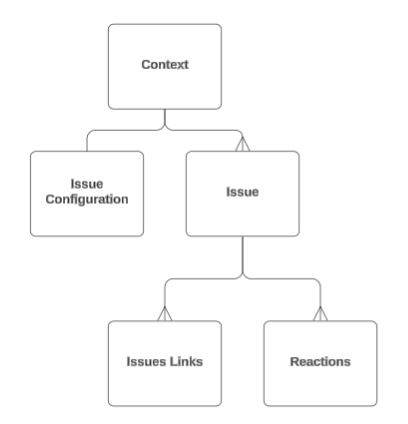
- contextId - The contextId defines the context in which Issues are created. For example a Trimble Connect project or a specific file.
- Issue Links - Links to resources that relate to the Issue. For example comments, views or document references.
- Issue Configuration - Configuration settings for a specified context. For example type, status and priority values and custom icons.